Advertisements
Showing posts with label Security. Show all posts

Sunday, September 28, 2014

// // Leave a Comment

How to Limit Bandwidth Per IP Address - MicroTik

Hi,

If you are administrator or manage network in your office, your most challenging work is to divide the bandwidth as per requirement of user and to stop un-necessary use of Internet Bandwidth causing slower internet for others.

Requirement/Background: 

Some of people always love to download songs, apps or other kind of digital data when they get Free Internet (that do not cost their own money). So they use most of bandwidth using Download Manager and other Accelerators.
If your internet connectivity is equipped with MicroTik devices like FirePro router or RouterBoard routers, here is the method to limit bandwidth per user/ip address.

Step 1: 

Login to router WinBox or Webfig using your Router Address and Username/Password. Default are admin/admin.

Step 2: 

Click on Queue Menu and click on Add button.

Step 3: 

You will see following screen. Fill the form as filled in example screenshot. Click Apply and OK to close the dialogue screen.


Now, whenever, the particular IP address try to cross the bandwidth limit which is specified here, that will automatically marked Red and restricted the bandwidth. Lets be clear with following screen.
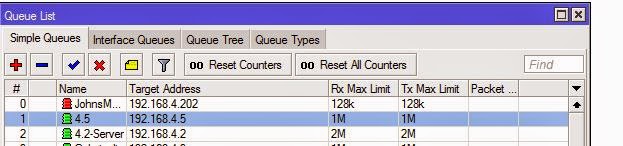
You have successfully put limit on user. Now the user can not cross the limit and the bandwidth will remain in flow.

You can also disable the Internet Access or Downloading or Uploading separately to particular IP address, without letting him know that we will discuss on next post.

Thanks for reading.
+John Bhatt  
Read More

Sunday, September 14, 2014

// // 1 comment

50 Lakh GMail Passwords Leaked

Hi,

This time its sad news if you use Google's Mail Service or any other Google product and might not enabled two step authentication or secure password which is not shared with anyone/anywhere.
Currently on 09 Sep 2014 23:38 a Russian BitCoin forum member has released 49,29,090 passwords with their account name and they are still publishing more.
Snapshot with Password of database. (Image Credit: BTSEC forum)

Reference:
Original Thread: BTSEC Forum
On CNews.ru : CNews.ru
DailyDot.com : DailyDot.com
They have released database in Plain text and which is of size 103 MB (108,763,323 bytes). They have compressed using format 7z and file available for download is 28.7 MB (30,108,353 bytes).

This list includes thousands of Yandex login passwords also. While according to Google and Yandex representative, the list is some old and might be collected using Phishing pages. As per Google there might be chance of hack between data transmission between two servers containing authentication records. They are working to fix it and make it more secure.

But, what of those, who have been compromised.

Suggested steps are:

  1. Keep your password strong enough.
  2. Do not enter your password anywhere else. Even some mail client or mobile application claiming that they serve mail might store and sent your password online.
  3. Enable two step authentication.
  4. Do not disclose your password during any online chat (asking for support/help) etc.
Thank you for reading.
+John Bhatt  
Read More

Wednesday, July 9, 2014

// // Leave a Comment

Software Review - Parental Control Software - Freeware

Hi,

It have been long time since last post. Today I am going to review a software that is is most useful if you work in a office and handle your IT department, If you have children at home and your want to block access to some sites without any visible changes, here is the best application for you.

Introduction:

Software name: Golden Filter Premium
Provider Company: GSI Technologies
File Name: GFPreSetup.exe
File Size: 3.10 MB
Latest Version: 3.1

Features: 

Some of the most important and required features listed below.

  • It does not create any folder or shortcut in Start Menu.
  • It does not create its files at easily visible place.
  • It does not create any taskbar icon while running. No one can know what is running in background.
  • It is totally safe (No Virus, Malware, Adware or any other kind of threat, confirmed with multiple antivirus applications. ex. MSE, Norton, AVG, QuickHeal, McAfee)
  • No listing at Add or Remove Program control panel. No one can remove it easily.
  • Can be disabled using software itself. 
  • Password Protected.
  • Toggle Function keys to show and hide application.
  • Can capture Screen and record to play later for administrator.
  • Restricted words to shut down any application running that contains such words (all supported Browsers).
  • Restricted Software
  • Hiding your important Folders
  • It is FREEWARE.

Screenshots:

Login Screen:

Home Screen:


Application Setting Screen: 
Time Based Setting Screen:
I have just included some of sample images. There a lot more control to use this application.

Download Links


Thanks for reading. One your next visit, I will be writing about the using method of this application with detailed snapshots. Please share if you find this post helpful.

Read More

Sunday, February 23, 2014

// // Leave a Comment

Torrent : Disadvantages and Controversies

Hi,

In a previous post about Torrent, I have explained working mechanism and origin of BitTorrent protocol and its use. If you missed, you may want to read that post at http://www.pyarb.com/2014/01/introduction-to-torrent.html. We also learnt about the advantages of Torrent and shared some snapshots also.
Now on continuation of that series, lets talk about its dis-advantages.

Disadvantages:

Torrent has many advantages like saving of time, peer to peer distribution, advance download experience for slower connection, it has many disadvantages too. Some of its dis-advantages are as listed below.

  1. No one can tell what is inside file until he finish downloading. Suppose creator told that it is Linux distribution with of Ubuntu's latest version and named file as resembling one. But no one can guaranty what is inside file actually until user finished downloading and open file. In case of illegal content or provider did not supplier any hash or MD5 sum over public, it can not predetermined. 
  2. For the first time, seeder must be online and seeding until the torrent gets popular. Or he must be always online to serve file and that too with higher internet speed. If he left in between, no one will get the file and users who downloaded some part will stuck at that point.
  3. Internet speed and computer performance is used by Bit-torrent protocol. Mostly upload speed of Internet is used to serve file and which may cause other services that depends on Internet to freeze.
  4. If the distribution has started once, it is hard to stop. If file gets popular and seeder thinks of stopping the distribution, it is impossible to stop until all users downloading torrent stop. That does not remains the property of creator.
  5. Un-authorized distribution has created a very big loss to most Software, Game, Movies and Music vendors. Some of users who paid for it distributed file over Internet using Torrent and that gets popular within minutes. Which caused loss in business. Many copyrighted materials are licked and distributed. Sometimes, the content is hijacked and distributed creating huge financial loss and reputation damage intentionally.
  6. The speed can not be stable (in most cases it is slow) and predetermined, depends upon the number of Seeders but that can not guaranty the speed. 
  7. File is served in pieces from different servers, so sometime result may be damaged or corrupted file.
  8. You can not use Download Managers or Accelerators to increase speed. 
  9. Source of media (file) is unrestricted. Illegal content hosting is very cheap and reliable using Torrent. If you own a website and host a copyrighted file, your web host may send you notice and if you do not stop your account may be suspended, but while using Torrent, no one is there is to stop except your ISP (Internet Service Provider).
  10. Torrent has great role on increasing Pornographic content over internet.
  11. If you are using Static IP to use Internet, there is privacy concern. Everybody downloading that torrent file can see your IP address and know what you are downloading.
  12. You must have a good Antivirus program, because sometime the torrent comes with Virus.
  13. The original content can not be altered once after serving started. For new versions or modified files you must create another torrent and share this While in case of direct download if the file changes in server, all users will get newer file automatically.
There are many other dis-advantages in case of Bit-Torrent system. You can add your own.

Controversies

Torrent has been always in Controversies since its early age. However it was created with a good motive, but it was being used to distribute copyrighted, paid, legal and sensitive data free of cost. Which caused lots of reputation and business loss to Software giants and specially Multimedia productions like Sony, Warner Bros, Universal and other many. The users uploaded the Paid Blue Ray discs or DVDs of movie and songs to torrent community causing birth to unstoppable piracy.
Some of the countries and authorities have declared Torrent safe and good while some other authorities put restrictions over torrent. Resulting many of the torrent site to legal threats and court cases. The most controversial website related to Torrent is ThePirateBay, TPB in short. TPB was founded by a Swedish group of members who are against copyright matters and want the content over internet to be shared free of cost. Which resulted them Lots of Penalty, many legal cases in different courts over globe, ban of their website on most countries. Instead of stopping their service, they started to display legal mails from Different high profile companies like Microsoft, Apple, Universal Studio and so many in their website publicly. Members who supported TPB including web hosting company and financier are also jailed for some month due to these controversies. Their server was attached multiple time by Internet authorities and other hackers who are against Torrent. But they are still stand and serving contents regularly. 
Other some top website examples are Supernova, TorrentSpy, Demonoid, etc which are on controversies due to serving Torrent file or indexing them.

If you have any suggestions of feedback about the post and our contents, do write us as comment or contact page. Till then keep visiting.
Read More

Monday, October 28, 2013

// // Leave a Comment

Change Login Screen Background in Windows 7

Hi,

Most of you are working with your computer and must have Windows 7 as main operating system. Windows 7 is the most stable and complete Operating system from Microsoft after Windows XP. There are many themes and background images available for Windows 7 in Microsoft personalization page.

As you have seen many Users using Windows 8 and their custom Lock Screen backgrounds. Means when they start windows they have a nice and custom background to Windows Login screen. However, Login Screen is same for all but the Background Image can be changed as per users choice.

But we have Windows 7 and I think this to do with Windows 7 also. In this post, we are going to change the background image of Login Screen of Windows 7 from default to any of your desired one. You can simply edit the same wallpaper and write some text there.

Lets start. Here we have two methods to do. One is simple and done with graphical method. Less chances of Damage to your OS. I will discuss the Manual method to change the Registry in another post sometime later.

Be-ware, you are doing this entirely on your own risk. In case anything wrong value changed or in case of misshapen, you will face entire loss and there will not be any fault of mine. I am providing tested and checked procedure and codes with screenshots.

Here is your normal Lock Screen (Login Screen in windows 7).

Download this Registry File: Custom background in Windows 7

Now extract the Zip file and open Registry file. You will see the screen like below.


Click Yes on User Account Control prompt. Next prompt will be like this.


Click Yes. This will modify value of a key in Registry of your Windows. You will see confirmation like below screen.


Now we can start working on our task. Lets get back to Windows Explorer and navigate to this address.


  • %windir%\system32\oobe
  • Create a New folder and rename to info.
  • Open info (newly created folder), Create a New Folder and rename to backgrounds.
  • Now paste/move your favourite image to newly created folder backgrounds.
  • Rename the wallpaper file to backgroundDefault.jpg.
Folder structure and names as same in above or in Screenshot.


Remember, Background image must be in JPEG format. Other formats will not work. 
Now have a look at your newly changed Background of Login Screen.

Lock your screen or Reboot your computer to see the changes. You might not see the background if you have single user account in Operating system without password and fast hardware resources. Press Windows+L key to go to Lock screen and see the changes. Below is mine.

Enjoy. 

Don't forget to subscribe to our posts and write comments. Bitter, funny or sweet, we will love them all.
+John Bhatt 
Read More

Monday, September 23, 2013

// // Leave a Comment

Taking Backup of Microsoft Outlook 2007/2010

Hi,

Today, I am going to show you how to Take Backup of your Outlook Express.

Well, starting from Introduction, Outlook Express used to be component application of Microsoft Windows XP. Then it is included in Microsoft Office Package in Version 2007, 2010 and 2013.


  • This method will work for these all three Outlook Editions. 
  • This method will keep your Inbox mails, Sent Box, Outbox, Drafts, Contacts and other Tasks and events created. 
First of All, Enable Show Hidden Files/Folders option in Windows Explorer properties. 
A quick step by step is below.

  1. Open Windows Explorer (ex. My Document, 
  2. Press Alt Key , 
  3. Choose Tools from Menu Bar, 
  4. Choose Options, 
  5. Then View Tab, 
  6. You will find an radio named View Hidden Files/Folders , if you scrolled dialogue container once. 
  7. Click OK to apply settings.
Now Open your Outlook Express.

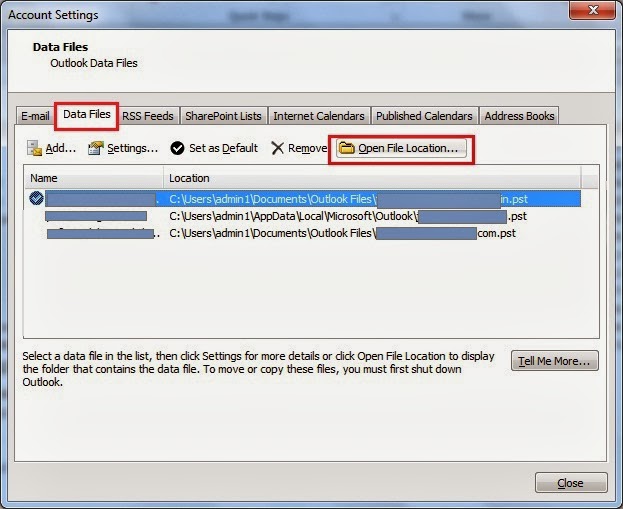
  1. Open Account Setting.
    • Menu > Tools > Account Settings (For Outlook Express 2007)
    • Office Button > Account Settings > Account Settings (For Outlook 2010 and 2013)
  2. Click on Data Files tab. 
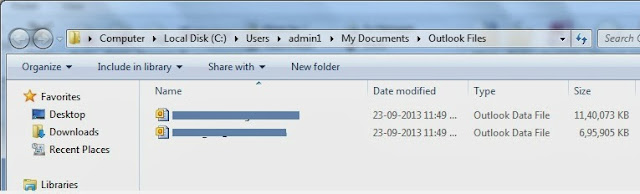
  3. Select Data File Name, which you want to Take backup and Click Open Folder Button.
  4. Copy the File to your Desired Location from Windows Explorer. 
Congratulations! 

You have successfully backed up your data file. 
Keep reading and provide feedback.
Read More

Saturday, July 27, 2013

// // Leave a Comment

Maintenance Complete in Download Center

Hi,

We have finished migrating all thing from Previous Host to New Host. Download Center is expected to Work as same as previous days. Accounts registered with our website has been kept same and you can log in with earlier credential. Other URLs and Bookmarks you added will also remain same and working.


However, Live FM's will be down for some more hours. We are working and collecting more reliable sources of stream. Once it will be done, we will notify you here.

You can keep in touch by Adding us on Facebook page, Just hit Like and Click Show in Feed link which will appear on hovering Like Button. You can also subscribe to new songs on Download Center  via Feedburner Service by Google. Google will drop you a mail once New Song is available on Download Center.

We have shifted to Higher Configuration and Dedicated Server without any Limitations, So Website is expected to load in less time and other resources also.

Till then, enjoy New songs in Download Center and have fun.


Regards,
+John Bhatt & Team
P.Yar.B Complex
Read More

Thursday, May 16, 2013

// // Leave a Comment

Welcome to New Google Plus

Hello Everyone,

Just before someday, I have updated you about the New Layout of Facebook. Today I am updating you about another Top most used Social Network from Google.

No, don't think about Orkut (you still remember), it is Google Plus. Google has recently changed Google Plus to Multi-column Layout. There is one Main Navigation Column as previous version but It is not Collapsible and HTML5. Google Plus is now using HTML5 and CSS3  which bring a HD display and many interesting features.


New Features:
  • Main Navigation is Collapses when you Click on home Button. 
  • Live Feeds are filtered according to the category you select with Post-Back which is Static when Page is Scrolled Down (Fixed position).
  • Multi-Column Layout to fit Maximum content.
  • New Improved Share Box with Ajax Popup. Just Zooms in Click, Lovely.

These are just some of the Graphical or UI Changes that are visible. Many more great Features are added on Events, Posting and other Security.

Hope you will switch to Google Plus if you are still Hanging on Facebook. By the way, I am also there, you can add me on your Circle, My Profile is +John Bhatt 

All the Best and enjoy.


Read More

Thursday, January 24, 2013

// // 20 comments

Opening a Bank Account in India for Nepalese Citizen

Hi,

Today, I am going to tell you some different thing. This is not related to Technology but it is related to your Social Life. As a known fact, most of Nepalese People are working in India in various industries including from home workers to Higher Level Management of private companies.


Some of us are here to earn some money, some are studying and some people are used to India and started their own business. We need to send money to Nepal for our relatives (home) or for friends, This is a normal procedure and task.

You just need to have some of the documents. Documents required for opening an account are as below:

  1. Passport or VISA Issued by Nepal Government.
  2. Citizenship card issued by Any District of Nepal
  3. Proof of Address (In India).
  4. Passport Size Photographs.

Details of the documents.

  1. Citizenship Card: Below is attached a sample Citizen ship card. 

  2. 2. Proof of Address: You need to submit a valid address proof while asked by Bank. Such, Address proof includes, Rent Aggrement between your House Owner and you. Telephone or Electricity Bill in your name,  Employment Letter issued by a Valid Company, and other documents as per Satisfaction to Officer who is responsible for opening an Account.
  3. Photographs: 3-4 Passport size Photographs taken in recent time.
  4. VISA or Passport: If you have VISA or PASSPORT issued by Nepal Government, you need not to have Citizenship card.

Steps to open an account.

If you do have Passport or VISA.
Just go to Nearest Branch of Any Bank. Fill the Form and submit your documents as mentioned above. Deposit minimum amount for your account as per instruction of officer. This Amount is INR 500.00 for Rural Areas and INR 1000.00 for Semi Urban, Urban and Metro regions of Government Sector Banks like, State Bank of India, Punjab National Bank, etc. While this amount is INR 2500.00 for Rural Area, INR 5000.00 for Semi Urban and INR 10000.00for Urban and Metros of Private Sector Bank like, ICICI Bank, HDFC Bank, Axix Bank etc.

If you do not have Passport or VISA.
You need to attest your Citizenship card in case you do not have Any International ID Card (VISA or PASSPORT). Citizenship card is taken as National ID Proof.

Steps to Attest your Citizenship Card.

The one and only authority to attest your Citizenship card is the Embassy of Nepal. Embassy of Nepal is located in Central New Delhi and Map is below Embedded. 


If you are going through Metro,Nearest Metro is Mandi House Metro. Office is closed on Saturday and Sunday. Go and write an Application for attesting your Citizenship.

Sample of Application

To,
The Ambassador,
Nepal Embassy, New Delhi,

Subject: Verification of Citizenship Card

Dear Sir,

I am, .........................., resident of  Nepal having permanent address of, ............... village, .............. VDC, ward No. ......... , District ............................, Zone .....................
I am working/studing in India and need to open an Bank Account. You are requested to kindly attest and issue an ID proof. My Original Citizenship card is attached herewith.

Sincerely,
......................
........................... (Local Address)

Write application in above format and submit with your Original Citizenship card, Photocopy of Citizenship card and submit. Once you submitted the document and application, It will be attested and notified to you within 30 minutes (may take longer).
You need to pay INR 125.00 and they will give you a Letter on Letter Head of Embassy of Nepal with their stamp.
A Sample is attached below.

Now, you just need to go to bank, Submit your Letter from Embassy, photocopy of Citizenship, Address Proof and photographs.

Congratulations, if you followed these steps, you will surely get an Account opened with your ID Proofs from your own Nation. Don't support fake agents that promise to make you Voter ID Card, Rasan Card or any other Indian Identity Proof. This is illegal.

You can add me to your Circle +John Bhatt .
Read More

Wednesday, January 2, 2013

// // Leave a Comment

Run Commands Listed In Alphabetical Order-2

Hi,
Here are the remaining Run Commands for Windows Operating System listed in Alphabetic Order.


Nero ( if installed )
nero
Netmeeting
conf
Network Connections
control netconnections
Network Connections
ncpa.cpl
Network Setup Wizard
netsetup.cpl
Notepad
notepad
Nview Desktop Manager ( if installed )
nvtuicpl.cpl
Object Packager
packager
ODBC Data Source Administrator
odbccp32
ODBC Data Source Administrator
odbccp32.cpl
On Screen Keyboard
osk
Opens AC3 Filter ( if installed )
ac3filter.cpl
Outlook Express
msimn
Paint
pbrush
Password Properties
password.cpl
Performance Monitor
perfmon.msc
Performance Monitor
perfmon
Phone and Modem Options
telephon.cpl
Phone Dialer
dialer
Pinball Game
pinball
Power Configuration
powercfg.cpl
Printers and Faxes
control printers
Printers Folder
printers
Private Characters Editor
eudcedit
Quicktime ( if installed )
quicktime.cpl
Quicktime Player ( if installed )
quicktimeplayer
Real Player ( if installed )
realplay
Regional Settings
intl.cpl
Registry Editor
regedit
Registry Editor
regedit32
Remote Access Phonebook
rasphone
Remote Desktop
mstsc
Removable Storage
ntmsmgr.msc
Removable Storage Operator Requests
ntmsoprq.msc
Resultant Set of Policy ( xp pro )
rsop.msc
Scanners and Cameras
sticpl.cpl
Scheduled Tasks
control schedtasks
Security Center
wscui.cpl
Services
services.msc
Shared Folders
fsmgmt.msc
Sharing Session
rtcshare
Shuts Down Windows
shutdown
Sounds Recorder
sndrec32
Sounds and Audio
mmsys.cpl
Spider Solitare Card Game
spider
SQL Client Configuration
clicongf
System Configuration Editor
sysedit
System Configuration Utility
msconfig
System File Checker Utility ( Scan Immediately )
sfc /scannow
System File Checker Utility ( Scan Once At Next Boot )
sfc /scanonce
System File Checker Utility ( Scan On Every Boot )
sfc /scanboot
System File Checker Utility ( Return to Default Settings)
sfc /revert
System File Checker Utility ( Purge File Cache )
sfc /purgecache
System File Checker Utility ( Set Cache Size to Size x )
sfc /cachesize=x
System Information
msinfo32
System Properties
sysdm.cpl
Task Manager
taskmgr
TCP Tester
tcptest
Telnet Client
telnet
Tweak UI ( if installed )
tweakui
User Account Management
nusrmgr.cpl
Utility Manager
utilman
Volume Serial Number for C:
label
Volume Control
sndvol32
Windows Address Book
wab
Windows Address Book Import Utility
wabmig
Windows Backup Utility ( if installed )
ntbackup
Windows Explorer
explorer
Windows Firewall
firewall.cpl
Windows Installer Details
msiexec
Windows Magnifier
magnify
Windows Management Infrastructure
wmimgmt.msc
Windows Media Player
wmplayer
Windows Messenger
msnsgs
Windows Picture Import Wizard (Need camera connected)
wiaacmgr
Windows System Security Tool
syskey
Windows Script host settings
wscript
Widnows Update Launches
wupdmgr
Windows Version ( shows your windows version )
winver
Windows XP Tour Wizard
tourstart
Wordpad
write
Zoom Utility
igfxzoom


Drop a comment below to reach me or provide feedback on above post.

Happy to Help. 
Glad to Be,
John Bhatt
Read More

Tuesday, November 6, 2012

// // Leave a Comment

Run Commands Listed In Alphabetical Order

Hi,
Here are the Run Commands for Windows Operating System listed in Alphabetic Order.


Program
Run Command
Accessibility Controls
access.cpl
Accessibility Wizard
accwiz
Add Hardware Wizard
hdwwiz.cpl
Add/Remove Programs
appwiz.cpl
Administrative Tools
control admintools
Adobe Acrobat ( if installed )
acrobat
Adobe Distiller ( if installed )
acrodist
Adobe ImageReady ( if installed )
imageready
Adobe Photoshop ( if installed )
photoshop
Automatic Updates
wuaucpl.cpl
Basic Media Player
mplay32
Bluetooth Transfer Wizard
fsquirt
Calculator
calc
Ccleaner ( if installed )
ccleaner
C: Drive
c:
Certificate Manager
cdrtmgr.msc
Character Map
charmap
Check Disk Utility
chkdsk
Clipboard Viewer
clipbrd
Command Prompt
cmd
Command Prompt
command
Component Services
dcomcnfg
Computer Management
compmgmt.msc
Compare Files
comp
Control Panel
control
Create a shared folder Wizard
shrpubw
Date and Time Properties
timedate.cpl
DDE Shares
ddeshare
Device Manager
devmgmt.msc
Direct X Control Panel ( if installed )
directx.cpl
Direct X Troubleshooter
dxdiag
Disk Cleanup Utility
cleanmgr
Disk Defragment
dfrg.msc
Disk Partition Manager
diskmgmt.msc
Display Properties
control desktop
Display Properties
desk.cpl
Display Properties (w/Appearance Tab Preselected )
control color
Dr. Watson System Troubleshooting Utility
drwtsn32
Driver Verifier Utility
verifier
Ethereal ( if installed )
ethereal
Event Viewer
eventvwr.msc
Files and Settings Transfer Tool
migwiz
File Signature Verification Tool
sigverif
Findfast
findfast.cpl
Firefox
firefox
Folders Properties
control folders
Fonts
fonts
Fonts Folder
fonts
Free Cell Card Game
freecell
Game Controllers
joy.cpl
Group Policy Editor ( xp pro )
gpedit.msc
Hearts Card Game
mshearts
Help and Support
helpctr
Hyperterminal
hypertrm
Hotline Client
hotlineclient
Iexpress Wizard
iexpress
Indexing Service
ciadv.msc
Internet Connection Wizard
icwonn1
Internet Properties
inetcpl.cpl
Internet Setup Wizard
inetwiz
IP Configuration (Display Connection Configuration)
ipconfig /all
IP Configuration (Display DNS Cache Contents)
ipconfig /displaydns
IP Configuration (Delete DNS Cache Contents)
ipconfig /flushdns
IP Configuration (Release All Connections)
ipconfig /release
IP Configuration (Renew All Connections)
ipconfig /renew
IP Configuration (Refreshes DHCP & Re-Registers DNS)
ipconfig /registerdns
IP Configuration (Display DHCP Class ID)
ipconfig /showclassid
IP Configuration (Modifies DHCP Class ID)
ipconfig /setclassid
Java Control Panel ( if installed )
jpicpl32.cpl
Java Control Panel ( if installed )
javaws
Keyboard Properties
control keyboard
Local Security Settings
secpol.msc
Local Users and Groups
lusrmgr.msc
Logs You Out of Windows
logoff
Malicious Software Removal Tool
mrt
Microsoft Access ( if installed )
access.cpl
Microsoft Chat
winchat
Microsoft Excel ( if installed )
excel
Microsoft Diskpart
diskpart
Microsoft Frontpage ( if installed )
frontpg
Microsoft Movie Maker
moviemk
Microsoft Management Console
mmc
Microsoft Narrator
narrator
Microsoft Paint
mspaint
Microsoft Powerpoint
powerpnt
Microsoft Word ( if installed )
winword
Microsoft Syncronization Tool
mobsync
Minesweeper Game
winmine
Mouse Properties
control mouse
Mouse Properties
main.cpl
MS-Dos Editor
edit
MS-Dos FTP
ftp

Remaining commands on next post.
Drop a comment below to reach me or provide feedback on above post.

Happy to Help. 
Glad to Be,
John Bhatt
Read More