Advertisements
Showing posts with label Internet. Show all posts

Sunday, September 28, 2014

// // Leave a Comment

How to Limit Bandwidth Per IP Address - MicroTik

Hi,

If you are administrator or manage network in your office, your most challenging work is to divide the bandwidth as per requirement of user and to stop un-necessary use of Internet Bandwidth causing slower internet for others.

Requirement/Background: 

Some of people always love to download songs, apps or other kind of digital data when they get Free Internet (that do not cost their own money). So they use most of bandwidth using Download Manager and other Accelerators.
If your internet connectivity is equipped with MicroTik devices like FirePro router or RouterBoard routers, here is the method to limit bandwidth per user/ip address.

Step 1: 

Login to router WinBox or Webfig using your Router Address and Username/Password. Default are admin/admin.

Step 2: 

Click on Queue Menu and click on Add button.

Step 3: 

You will see following screen. Fill the form as filled in example screenshot. Click Apply and OK to close the dialogue screen.


Now, whenever, the particular IP address try to cross the bandwidth limit which is specified here, that will automatically marked Red and restricted the bandwidth. Lets be clear with following screen.
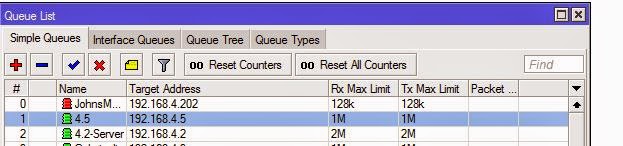
You have successfully put limit on user. Now the user can not cross the limit and the bandwidth will remain in flow.

You can also disable the Internet Access or Downloading or Uploading separately to particular IP address, without letting him know that we will discuss on next post.

Thanks for reading.
+John Bhatt  
Read More

Sunday, September 14, 2014

// // 1 comment

50 Lakh GMail Passwords Leaked

Hi,

This time its sad news if you use Google's Mail Service or any other Google product and might not enabled two step authentication or secure password which is not shared with anyone/anywhere.
Currently on 09 Sep 2014 23:38 a Russian BitCoin forum member has released 49,29,090 passwords with their account name and they are still publishing more.
Snapshot with Password of database. (Image Credit: BTSEC forum)

Reference:
Original Thread: BTSEC Forum
On CNews.ru : CNews.ru
DailyDot.com : DailyDot.com
They have released database in Plain text and which is of size 103 MB (108,763,323 bytes). They have compressed using format 7z and file available for download is 28.7 MB (30,108,353 bytes).

This list includes thousands of Yandex login passwords also. While according to Google and Yandex representative, the list is some old and might be collected using Phishing pages. As per Google there might be chance of hack between data transmission between two servers containing authentication records. They are working to fix it and make it more secure.

But, what of those, who have been compromised.

Suggested steps are:

  1. Keep your password strong enough.
  2. Do not enter your password anywhere else. Even some mail client or mobile application claiming that they serve mail might store and sent your password online.
  3. Enable two step authentication.
  4. Do not disclose your password during any online chat (asking for support/help) etc.
Thank you for reading.
+John Bhatt  
Read More

Friday, July 11, 2014

// // Leave a Comment

KitKat update for Motorola Moto E

Hi,
If you are using Motorola Moto E, here is the great news. As motorola has announced on 5th of this month regarding KitKat 4.4.4 update, they have released update today.

Check screens below.


Tap on Setting > About Phone > System Updates if you did not get any notifications.

Oh yes, It is approx 57.9 MB in size, so you can easily download it over mobile data connection.

Enjoy your update.

Thanks for reading. 
John Bhatt
Read More

Wednesday, July 9, 2014

// // Leave a Comment

Software Review - Parental Control Software - Freeware

Hi,

It have been long time since last post. Today I am going to review a software that is is most useful if you work in a office and handle your IT department, If you have children at home and your want to block access to some sites without any visible changes, here is the best application for you.

Introduction:

Software name: Golden Filter Premium
Provider Company: GSI Technologies
File Name: GFPreSetup.exe
File Size: 3.10 MB
Latest Version: 3.1

Features: 

Some of the most important and required features listed below.

  • It does not create any folder or shortcut in Start Menu.
  • It does not create its files at easily visible place.
  • It does not create any taskbar icon while running. No one can know what is running in background.
  • It is totally safe (No Virus, Malware, Adware or any other kind of threat, confirmed with multiple antivirus applications. ex. MSE, Norton, AVG, QuickHeal, McAfee)
  • No listing at Add or Remove Program control panel. No one can remove it easily.
  • Can be disabled using software itself. 
  • Password Protected.
  • Toggle Function keys to show and hide application.
  • Can capture Screen and record to play later for administrator.
  • Restricted words to shut down any application running that contains such words (all supported Browsers).
  • Restricted Software
  • Hiding your important Folders
  • It is FREEWARE.

Screenshots:

Login Screen:

Home Screen:


Application Setting Screen: 
Time Based Setting Screen:
I have just included some of sample images. There a lot more control to use this application.

Download Links


Thanks for reading. One your next visit, I will be writing about the using method of this application with detailed snapshots. Please share if you find this post helpful.

Read More

Wednesday, April 23, 2014

// // Leave a Comment

Twitter Updated its Layout

Hi,

If you are using Twitter, here is a good news for you all. Now twitter has updated its layout and made similar as Older Facebook layout. It has 3 columns and based in your screen resolution, it reduce to 2 column.
Some of the new features are as below.
Big Profile Photo
Bigger Header Image

Feature to Filter Tweets
When you Joined Twitter
Bigger notification for Followers profile
Ability to Pin Ability

Custom size for Tweets according to their popularity
There are a lot of new features also available. You are requested to visit and check yourself.
Reference: Aakarpost
Thanks for reading. Please provide feedback and comments and do not forget to share.
+John Bhatt 
Read More

Sunday, February 23, 2014

// // Leave a Comment

Torrent : Disadvantages and Controversies

Hi,

In a previous post about Torrent, I have explained working mechanism and origin of BitTorrent protocol and its use. If you missed, you may want to read that post at http://www.pyarb.com/2014/01/introduction-to-torrent.html. We also learnt about the advantages of Torrent and shared some snapshots also.
Now on continuation of that series, lets talk about its dis-advantages.

Disadvantages:

Torrent has many advantages like saving of time, peer to peer distribution, advance download experience for slower connection, it has many disadvantages too. Some of its dis-advantages are as listed below.

  1. No one can tell what is inside file until he finish downloading. Suppose creator told that it is Linux distribution with of Ubuntu's latest version and named file as resembling one. But no one can guaranty what is inside file actually until user finished downloading and open file. In case of illegal content or provider did not supplier any hash or MD5 sum over public, it can not predetermined. 
  2. For the first time, seeder must be online and seeding until the torrent gets popular. Or he must be always online to serve file and that too with higher internet speed. If he left in between, no one will get the file and users who downloaded some part will stuck at that point.
  3. Internet speed and computer performance is used by Bit-torrent protocol. Mostly upload speed of Internet is used to serve file and which may cause other services that depends on Internet to freeze.
  4. If the distribution has started once, it is hard to stop. If file gets popular and seeder thinks of stopping the distribution, it is impossible to stop until all users downloading torrent stop. That does not remains the property of creator.
  5. Un-authorized distribution has created a very big loss to most Software, Game, Movies and Music vendors. Some of users who paid for it distributed file over Internet using Torrent and that gets popular within minutes. Which caused loss in business. Many copyrighted materials are licked and distributed. Sometimes, the content is hijacked and distributed creating huge financial loss and reputation damage intentionally.
  6. The speed can not be stable (in most cases it is slow) and predetermined, depends upon the number of Seeders but that can not guaranty the speed. 
  7. File is served in pieces from different servers, so sometime result may be damaged or corrupted file.
  8. You can not use Download Managers or Accelerators to increase speed. 
  9. Source of media (file) is unrestricted. Illegal content hosting is very cheap and reliable using Torrent. If you own a website and host a copyrighted file, your web host may send you notice and if you do not stop your account may be suspended, but while using Torrent, no one is there is to stop except your ISP (Internet Service Provider).
  10. Torrent has great role on increasing Pornographic content over internet.
  11. If you are using Static IP to use Internet, there is privacy concern. Everybody downloading that torrent file can see your IP address and know what you are downloading.
  12. You must have a good Antivirus program, because sometime the torrent comes with Virus.
  13. The original content can not be altered once after serving started. For new versions or modified files you must create another torrent and share this While in case of direct download if the file changes in server, all users will get newer file automatically.
There are many other dis-advantages in case of Bit-Torrent system. You can add your own.

Controversies

Torrent has been always in Controversies since its early age. However it was created with a good motive, but it was being used to distribute copyrighted, paid, legal and sensitive data free of cost. Which caused lots of reputation and business loss to Software giants and specially Multimedia productions like Sony, Warner Bros, Universal and other many. The users uploaded the Paid Blue Ray discs or DVDs of movie and songs to torrent community causing birth to unstoppable piracy.
Some of the countries and authorities have declared Torrent safe and good while some other authorities put restrictions over torrent. Resulting many of the torrent site to legal threats and court cases. The most controversial website related to Torrent is ThePirateBay, TPB in short. TPB was founded by a Swedish group of members who are against copyright matters and want the content over internet to be shared free of cost. Which resulted them Lots of Penalty, many legal cases in different courts over globe, ban of their website on most countries. Instead of stopping their service, they started to display legal mails from Different high profile companies like Microsoft, Apple, Universal Studio and so many in their website publicly. Members who supported TPB including web hosting company and financier are also jailed for some month due to these controversies. Their server was attached multiple time by Internet authorities and other hackers who are against Torrent. But they are still stand and serving contents regularly. 
Other some top website examples are Supernova, TorrentSpy, Demonoid, etc which are on controversies due to serving Torrent file or indexing them.

If you have any suggestions of feedback about the post and our contents, do write us as comment or contact page. Till then keep visiting.
Read More

Saturday, February 1, 2014

// // 9 comments

HTTP Error 500.23 - Internal Server Error in Visual Studio 2013

Hi,

I have installed Visual Studio 2013 in my system. Due to some problems, I got the release after few months. So I was excited to use it and taste its new features. One thing I like about Visual Studio 2013 is it has a theme which turns it like Visual Studio 2010, which was simply awesome.

HTTP Error 500.23

I opened a existing website and tried to run that website. The website was using ASP.NET framework 4.0. However, the website has no errors and working fine in previous version of Visual Studio. But when I started with debugging (F5), this produced following error.
HTTP Error 500.23 - Internal Server Error

An ASP.NET setting has been detected that does not apply in Integrated managed pipeline mode.

Solution

I can not understand the problem in a single view, as it suggest to change some configuration different methods in things you can try section. While there is not handler configured in web.config system for Web Server. Instead there was no system.webServer node.
So I searched in Internet and found some suggestion to make changes in Application Pool setting in IIS Manager. I tried that too but that was also a failed trial. Then suddenly I got a click in my mind and tried a setting which worked immediately.
How can the change done in Internet Information Service (IIS) Manager reflect in Development server. When we run the website from Visual Studio it loads in development server instead of IIS. So we have to make change in Development server which will automatically solve all the problems.
I thought, some time you might have same situation and solution must be there before problem.
Step 1: Open visual studio and click in the name of Website Project currently opened. Click on Property pane
.
Step 2: Double click on Managed Pipeline Mode. This will toggle between Classic and Integrated Mode. You have to switch to Classic mode because the error was "An ASP.NET setting has been detected that does not apply in Integrated managed pipeline mode"
.
Now hit the F5 button, here goes output as usual.

You have solved the problem. If you find this post helpful, do not forget to share with friends or simply say thanks in comment below or you can share your feedback by leaving comment below.
+Prithvi Raj Bhatt 
Read More

Thursday, January 30, 2014

// // Leave a Comment

Adding CommentLuv in Blogger

Hi,
Once again, a new post for all blogger friends. As you are aware, the quality back-link has great value in website ranking. Most of blogger want to increase their ranking on various measurement tools and follow many tricks. They use many tools available over internet.

CommentLuv / IntenseDebate

In case of blog, one of the most used and must have feature is comment system. You should know what your visitor think about your post, so there should be a commenting system which is powerful, can protect spam, give you ability to control them and other administration features. Disqus is one of the most used commenting system. Another powerful and most used commenting platform is CommentLuv from IntenseDebate. This is an Automattic product. Automattic is company which made WordPress, JetPack, Askimet and other web products which are used by approx 70-80 % of web-masters. So by default, CommenLuv comes with Askimet spam protection which is actually powerful and blocks spam without any extra effort. Best thing about IntenseDebate is it is free. We will learn how to integrate CommentLuv comments with blogger template so that our blog can display and work with IntenseDebate commenting system.

Procedure

  1. Open http://intensedebate.com/signup.
  2. Fill the required details, If you have already got a WodPress.com account, you can login using WordPress API.
  3. If you are registering for first time, you must confirm your email id. Check you inbox and confirm email.
  4. Login to intensedebate.com using your username/password.
  5. Click on Sites menu and choose Add Blog/Site or navigate to https://intensedebate.com/install

  6. Put the domain of your blog. They have great support for Blogger. You can put your custom domain or blogger.com domain name and click next.
  7. This is choose your platform screen. Currently they have automated tools for WordPress.org, TypePad, tumblr and Blogger. Click on Blogger button. Remember, classic blogger is not supported.
     
  8. Now the next step is to login to blogger. Remember, you are using Modern version of Blogger. Navigate to Template section.
  9. Click on Backup/Restore button on right top corner. 
  10. You will be asked to download the template or upload. Click on "Download Full Template" button.
  11. Save this XML file (blogger template) to hard disc. Now navigate back to IntenseDebate website.
  12. Next screen is installer screen for blogger. There are some steps. They will ask you either you want to put commenting system in all posts or in new posts only. Selecting All posts will delete all older comments made using Blogger comment system. So this is not recommended if you have lots of comments in website earlier.
  13. There is a File Upload button in Step 5, click on button, upload your newly saved XML template. The rest is on IntenseDebate.
  14. Once file is uploaded, they read content and place all settings and codes themselves in template and write all code in a textbox.
  15. Now copy all that text and navigate to blogger. Click on Edit HTML button. 

  16. Replace all content in editor and click on Save Template button. Your all existing script customizations, texts, widgets will remain same and as per your settings, you can see the IntenseDebate commending system enabled in your blog posts.
You have successfully completed the installation of IntenseDebate commending system in your blogger powered blog. Leave feedback about your reading experience. Your feedback will help us to improve.

Thanks for reading.
Read More

Wednesday, January 29, 2014

// // Leave a Comment

Story behind OneDrive - Microsoft re-branded SkyDrive

Hi,

Some time ago, I have written a blog post about introduction to SkyDrive. Microsoft has publicly announced to Re-Brand the SkyDrive with new name and it will be called OneDrive.
Now skydrive blog and website are also available with new name OneDrive. As in the official blog post from Microsoft at http://blog.onedrive.com/onedrive-for-everything-your-life, "Of course, changing the name of a product as loved as SkyDrive wasn’t easy."

Story Behind Re-branding

Microsoft has launched SkyDrive in 2007. But a British television broadcasting company SkyDigital (BSkyB) filed a Trademark violation case for the use of word "Sky" against Microsoft in 2013. Later Microsoft and BSkyB made a agreement and Microsoft agreed to change the name of it's cloud storage service within reasonable period of time. Five months later, based on this, Microsoft has decided to change its name to OneDrive and publicly announced on 27th January 2014.

OneDrive

"Why OneDrive? We know that increasingly you will have many devices in your life, but you really want only one place for your most important stuff." As said in Preview website, some new features are expected one this version with New Brand name. Microsoft can increase storage capacity and expected to launch premium plans with more storage.

References

BBC News: Microsoft made to rename Skydrive after BSkyB victory
Wikipedia  : SkyDrive
OneDrive Blog : OneDrive for Everything in Your Life.
Note: Text in Italic is copied from references.
We will keep you posted on further changes and announcements. Keep reading.
+John Bhatt 
Read More

Thursday, January 9, 2014

// // Leave a Comment

Introduction to Torrent

Hi,

Have you heard of torrent? Oh! you must have. Many of you have used torrent to download files and other documents from internet. But many of us are unaware of how torrent works and what torrent is?

Lets talk about Torrent in detail.

What is torrent?

Torrent is actually a computer file type used by BitTorrent protocol. This file contains meta data about the file's and folder's size, their list of locations (called trackers in language of torrent). This has extension of .torrent. One more and most important thing about torrent file is that, it does not contain files or folders that you want to download. It only contains the Structure, Location and other information about file. In current days, this has been replaced by Magnet Link which is a web version (hyper link) of this file containing all information about this file.

History of BitTorrent?

BitTorrent is a peer to peer file sharing protocol developed by Programmer Bram Cohen and first released on April 2001. He released it for public on 2 July 2001 on first time and continuously developed till 2008. As per BitTorrent, Inc which has published official client also, revealed that number of Torrent users per day over world is twice than the users of Facebook and YouTube combined together. 

How it works?

Now, if the torrent file does not contain files to be downloaded, how actually it works? Lets see a image below to understand more clearly.

Requirement and Background

While the file is of Gigantic size and need to be distributed among many users, what is the cost of server. The same amount of data has been transferred to each users. Suppose a file of one GB is to be shared among a thousand users. Then server needs more than a one Terra Byte of bandwidth which will surely cost a lot for any company. This will also impact the performance of server. To overcome this, BitTorrent protocol is designed where you need not to distribute file to each user, Once user downloaded a file, that can even uploaded from users PC.
Most of Computer Science students are known and for others information, data is transmitted in Packets over internet. A complete file can not be transferred at at time if that has lot of data. And you have heard of Bit and Byte. At a single time a limited byte of data can only travel or transmits between two IP (computers).
Suppose, we have a file of 100 MB and our computer hardware determines and think that it can be transmitted if the file has been broken into 100 pieces and then tells receiver that it has send 100 pieces of a file, combine and give to user, in general language. This is also applicable for torrent also. Torrent file has meta data where the piece size has been mentioned. The complete file has been broken into pieces and assigned a serial number (virtual). Then at the time of distribution, these pieces are downloaded to users computer one by one. And most importantly, based on permission from user, the downloaded pieces are again uploaded to other user who is downloading same file.

Advantage

Following are major advantage of torrent protocol for user and uploader.

  • Server cost is reduces because file is later shared using peers (other users who are downloading)
  • Even your Internet get disconnected or you shut down your computer, your files are saved in hard disk and if you think of continuing the download, only remaining pieces will downloaded. This is intelligence added in BitTorrent clients. 
  • Better download speed.
  • Faster distribution
We will talk about legal controversies and other bad aspects of torrent system on later post. 

If you find this post helpful, say thanks on comments or you have any suggestions or feedback on this, please comment.

Read More

Sunday, January 5, 2014

// // Leave a Comment

Cloud Storage : SkyDrive

Hi,
Some time ago, we have talked about Cloud Storage. Continuation of that series, I am going to write here about SkyDrive, a cloud storage facility provided by Microsoft to its user for free with custom upgradable plans also.

Introduction:

SkyDrive logos at various stages

   Microsoft SkyDrive is included with Windows Live product and previously known as Windows Live Folders, then Windows Live SkyDrive and now SkyDrive or Microsoft SkyDrive. Being officially announced on 01 August 2007, this product is tested by some BETA testers across United States and UK. Initially storage capacity is given 5GB per user which is expanded to 25 GB on 02 December 2008. On continuous improvement of service, SkyDrive is integrated with Office Web Apps and Outlook.com (formerly Hotmail) to attach larget Photos and other documents as email attachments. 

Current

Now, SkyDrive is developed for various platforms and available for most of devices. Now it has its native application for Apple's iOS and Mac, Google's Android, Microsoft's Windows (Desktop version for Windows 7 and prior version), Windows 8, Windows 8.1, Windows Phone and XBox 360 also with Web version. Due to high volume of users and popularity, its size has been reduced to 7 GB for new registrations. Emails registered after 22 April 2012 will get 7 GB for free while members registered before that date have 25GB of free storage. You can upload every kind of file in SkyDrive, there is no restriction of File Type. SkyDrive is  currently available over world with 94 languages. Microsoft launched Premium plans of SkyDrive on 23 September 2013 which are divided in 3 classes for 50+, 100+ and 200+ which adds corresponding GBs of data to user account.
The Desktop version and other application has capability to Sync file and save to cloud as preferred by user over internet.

Registration & Login

Everyone, who signs up for Microsoft Live Account has access to All of the Windows Live services including SkyDrive. SkyDrive is accessible at https://skydrive.live.com.

Features

There are lots of feature of using Cloud Storage, but we will just list some of SkyDrive features that are notable.

  • Integrated with Office Web Apps, you can create or edit your document online.
  • Format support of PDF, XML based Document and ODF with lots more.
  • Document Embedding on web and sharing with friends which makes it useful at work.
  • Email Integration, send directly via email as attachment to any email id.
  • Share with Windows Live Groups, such as your office team have access to your work files and they can work even you are not at office and multiple users at at time.
  • Slideshow of uploaded photos.
  • Recycle Bin. Most useful tool for cloud storage. Suppose you uploaded a larger file and deleted by mistake. SkyDrive gives you option to Restore your file within maximum of 30 days period.
  • Download all your files in single Zip file and extract at your machine.

Snapshots

SkyDrive for Web (Current Version)
Android

Windows 8.1

For a Developer

SkyDrive has launched its API so that developer can develop applications for Windows Phone, Windows 8 and 8.1 and other portable devices which has ability to store data and access to SkyDrive of user.

Download

Applications are available for downloads free on various platforms. 

If you found this post helpful, do share and if you have any feedback please post a comment. 
Read More

Sunday, September 29, 2013

// // Leave a Comment

Redirect User to same Location on Different Domain

Hi,

Recently, I have changed my Blog address. Due to this, I have to face a lot of Traffic Loss.

My situation was, I have a Blogger blog and a domain. A lot of Links have been shared and If I change the Blog address and create a Permanent Redirect by changing DNS, but existing Bookmarks and Shared Links will not load properly. So, I kept the Existing Domain running and created a New Blog. Exported Template and Blog, Uploaded both to New Domain and just keep both domain running up. Now I have to redirect all visitors to Previous Domain to New Domain.


Here I came with a solution.

I have created a Simple JavaScript function.

<script>
    function redirect()
    {
    //You change your Domain name just in place of "http://www.pyarb.com".
    
  window.location = "http://www.pyarb.com/" + window.location.pathname;
    }
</script>

Description:

1. windows.location - This will set the Location of Window (i.e. Address of Browser.)
2. "http://www.pyarb.com" - This is your New Domain. Where you have kept all File structure same. Means Links are same for All files except Domain Name.
3. windows.location.pathname - This will get the Path of Window Location (i.e. Address of Browser except Domain Name.)

Then Executed this function on PageLoad event.

......
.......
</head>
<body onload="redirect();">
.........
.........

That's It. Your location remains same.

Enjoy,
+John Bhatt 
Read More
// // Leave a Comment

Mail App (Windows 8) Keyboard Shortcuts

Hi,

Today, I have collected the List of Keyboard shortcuts for Windows 8 Mail App. I know you must be  using Mail App if you have Windows 8 or Windows 8.1.

There are some problems with Older shortcut of Mail App (Outlook) in previous windows.


Here is the complete list of Keyboard combination to perform your task easily and in timely manner.
 
Combination Function/Output
Ctrl+R Reply
Ctrl+Shift+R Reply all
Ctrl+F Forward
Ctrl+M Move item to a folder
Ctrl+J Toggle between marking a message as junk or not junk
Ctrl+Shift+U Show only unread messages
Ctrl+Shift+A Show all messages
Ctrl+Shift+E Show Folder options
Ctrl+U Mark as unread
Ctrl+Q Mark as read
Ctrl+A Select all messages
Insert Toggle between Flag and Remove flag for messages
Ctrl+N New Message
F5 Sync
Alt+B Put focus on the bcc button
Alt+C Put focus on the cc button / Accept
Alt+D Decline
Alt+T Put focus on the To button / Tentative
Alt+V Open the invitation in Calendar
Alt+S Send mail
Alt+I Insert attachment
Ctrl+Shift+F Select a font
Ctrl+Spacebar Clear formatting
Ctrl+Y Redo
F4 Redo
Ctrl+[ Increase font size one point
Ctrl+] Decrease font size one point
Ctrl+Shift+, Decrease font size
Ctrl+Shift+. Increase font size
Ctrl+K Add a link
Ctrl+E Center
Ctrl+L Left
Ctrl+R Right
Ctrl+Shift+L Bullets
Ctrl+M Indent when text is selected
Ctrl+Shift+M Outdent
Tab or Shift+Tab Indent/outdent when text is selected or when focus is in a list
Ctrl+' Acute accent
Ctrl+, Cedilla accent
Ctrl+Shift+6 Circumflex accent
Ctrl+Shift+; Diaeresis accent
Ctrl+` Grave accent
Ctrl+Shift+7 Ligature accent
Ctrl+Shift+2 Ring accent
Ctrl+/ Slash accent
Ctrl+Shift+` Tilde accent
Alt+Ctrl+Shift+1 Inverted exclamation mark
Alt+Ctrl+Shift+/ Inverted question mark

Hope these will be helpful in your working. Keep visiting.

+John Bhatt 
Read More

Thursday, September 26, 2013

// // Leave a Comment

Blogger Comment Box Updated

Hi,

This is a good news for all blogger. Google has recently updated its default Comment box in Blogger website. As we know, many of blogger are still using Bloggers Templates (I mean not using Custom Templates) and are annoyed of Older Comment Box.

This is for those bloggers who are not using Google+ comment system.


This Comment  Box had no option to Preview your comment body. Neither to get Notified when someone responds to your Comment.

But now, Google has updated Bloggers comment box to a new and beautiful layout. If you are logged In, you can click on the Button Notify. Means when someone responds to your Comment, you can get a message in your mailbox.

If you are logged Out and want to comment, your Profile selection screen will be also modified.


So, Enjoy.

Till then, you can add me on Circle at +John Bhatt 
Read More

Monday, September 23, 2013

// // Leave a Comment

Taking Backup of Microsoft Outlook 2007/2010

Hi,

Today, I am going to show you how to Take Backup of your Outlook Express.

Well, starting from Introduction, Outlook Express used to be component application of Microsoft Windows XP. Then it is included in Microsoft Office Package in Version 2007, 2010 and 2013.


  • This method will work for these all three Outlook Editions. 
  • This method will keep your Inbox mails, Sent Box, Outbox, Drafts, Contacts and other Tasks and events created. 
First of All, Enable Show Hidden Files/Folders option in Windows Explorer properties. 
A quick step by step is below.

  1. Open Windows Explorer (ex. My Document, 
  2. Press Alt Key , 
  3. Choose Tools from Menu Bar, 
  4. Choose Options, 
  5. Then View Tab, 
  6. You will find an radio named View Hidden Files/Folders , if you scrolled dialogue container once. 
  7. Click OK to apply settings.
Now Open your Outlook Express.

  1. Open Account Setting.
    • Menu > Tools > Account Settings (For Outlook Express 2007)
    • Office Button > Account Settings > Account Settings (For Outlook 2010 and 2013)
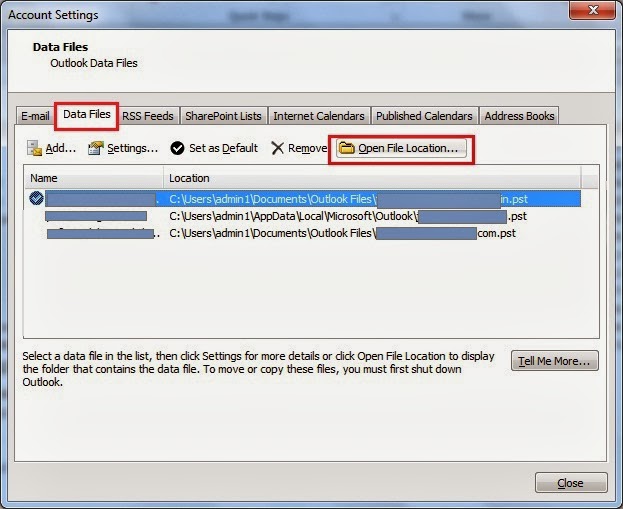
  2. Click on Data Files tab. 
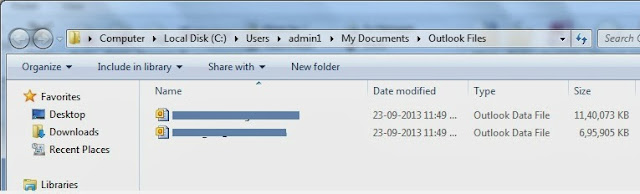
  3. Select Data File Name, which you want to Take backup and Click Open Folder Button.
  4. Copy the File to your Desired Location from Windows Explorer. 
Congratulations! 

You have successfully backed up your data file. 
Keep reading and provide feedback.
Read More

Tuesday, September 10, 2013

// // 3 comments

Google and Its Domains

Hi,

This is the list of Google's Domains till date. Other Services and Google Product domain are not included.

Top level domain Extension Country Name
http://www.google.ad .ad  Andorra
http://www.google.ae .ae  United Arab Emirates
http://www.google.am .am  Armenia
http://www.google.as .as  American Samoa
http://www.google.at .at  Austria
http://www.google.az .az  Azerbaijan
http://www.google.ba .ba  Bosnia and Herzegovina
http://www.google.be .be  Belgium
http://www.google.bf .bf  Burkina Faso
http://www.google.bg .bg  Bulgaria
http://www.google.bi .bi  Burundi
http://www.google.bj .bj  Benin
http://www.google.bs .bs  Bahamas
http://www.google.by .by  Belarus
http://www.google.ca .ca  Canada
http://www.google.cat .cat reserved for the Catalan linguistic and cultural 
http://www.google.cd .cd  Congo, The Democratic Republic of the
http://www.google.cf .cf  Central African Republic
http://www.google.cg .cg  Congo
http://www.google.ch .ch  Switzerland
http://www.google.ci .ci  Cote d'Ivoire
http://www.google.cl .cl  Chile
http://www.google.cm .cm  Cameroon
http://www.google.cn cn  China
http://www.google.co.ao .ao  Angola
http://www.google.co.bw .bw  Botswana
http://www.google.co.ck .ck  Cook Islands
http://www.google.co.cr .cr  Costa Rica
http://www.google.co.id .id  Indonesia
http://www.google.co.il .il  Israel
http://www.google.co.in .in  India
http://www.google.co.jp .jp  Japan
http://www.google.co.ke .ke  Kenya
http://www.google.co.kr .kr  Korea, Republic of
http://www.google.co.ls .ls  Lesotho
http://www.google.co.ma .ma  Morocco
http://www.google.co.mz .mz  Mozambique
http://www.google.co.nz .nz  New Zealand
http://www.google.co.th .th  Thailand
http://www.google.co.tz .tz  Tanzania, United Republic of
http://www.google.co.ug .ug  Uganda
http://www.google.co.uk .uk  United Kingdom
http://www.google.co.uz .uz  Uzbekistan
http://www.google.co.ve .ve  Venezuela, Bolivarian Republic of
http://www.google.co.vi .vi  Virgin Islands, U.S.
http://www.google.co.za .za  South Africa
http://www.google.co.zm .zm  Zambia
http://www.google.co.zw .zw  Zimbabwe
http://www.google.com .com United States
http://www.google.com.af .af  Afghanistan
http://www.google.com.ag .ag  Antigua and Barbuda
http://www.google.com.ai .ai  Anguilla
http://www.google.com.ar .ar  Argentina
http://www.google.com.au .au  Australia
http://www.google.com.bd .bd  Bangladesh
http://www.google.com.bh .bh  Bahrain
http://www.google.com.bn .bn  Brunei Darussalam
http://www.google.com.bo .bo  Bolivia
http://www.google.com.br .br  Brazil
http://www.google.com.bz .bz  Belize
http://www.google.com.co .co Colombia
http://www.google.com.cu .cu  Cuba
http://www.google.com.cy .cy  Cyprus
http://www.google.com.do .do  Dominican Republic
http://www.google.com.ec .ec  Ecuador
http://www.google.com.eg .eg  Egypt
http://www.google.com.et .et  Ethiopia
http://www.google.com.fj .fj  Fiji
http://www.google.com.gh .gh  Ghana
http://www.google.com.gi .gi  Gibraltar
http://www.google.com.gt .gt  Guatemala
http://www.google.com.hk .hk  Hong Kong
http://www.google.com.jm .jM Jamaica
http://www.google.com.kh .kh  Cambodia
http://www.google.com.kw .kw  Kuwait
http://www.google.com.lb .lb  Lebanon
http://www.google.com.ly .ly  Libya
http://www.google.com.mt .mt  Malta
http://www.google.com.mx .mx  Mexico
http://www.google.com.my .my  Malaysia
http://www.google.com.na .na  Namibia
http://www.google.com.nf .nf  Norfolk Island
http://www.google.com.ng .ng  Nigeria
http://www.google.com.ni .ni  Nicaragua
http://www.google.com.np .np  Nepal
http://www.google.com.om .om Oman
http://www.google.com.pa .pa  Panama
http://www.google.com.pe .pe  Peru
http://www.google.com.ph .ph  Philippines
http://www.google.com.pk .pk  Pakistan
http://www.google.com.pr .pr  Puerto Rico
http://www.google.com.py .py  Paraguay
http://www.google.com.qa .qa  Qatar
http://www.google.com.sa .sa  Saudi Arabia
http://www.google.com.sb .sb  Solomon Islands
http://www.google.com.sg .sg  Singapore
http://www.google.com.sl .sl  Sierra Leone
http://www.google.com.sv .sv  El Salvador
http://www.google.com.tj .tj  Tajikistan
http://www.google.com.tr .tr  Turkey
http://www.google.com.tw .tw  Taiwan, Province of China
http://www.google.com.ua .ua  Ukraine
http://www.google.com.uy .uy  Uruguay
http://www.google.com.vc .vc  Saint Vincent and the Grenadines
http://www.google.com.vn .vn  Viet Nam
http://www.google.cv .cv  Cape Verde
http://www.google.cz .cz  Czech Republic
http://www.google.de .de  Germany
http://www.google.dj .dj  Djibouti
http://www.google.dk .dk  Denmark
http://www.google.dm .d  Dominica
http://www.google.dz .dz  Algeria
http://www.google.ee .ee  Estonia
http://www.google.es .es  Spain
http://www.google.fi .fi  Finland
http://www.google.fm .f  Micronesia
http://www.google.fr .fr  France
http://www.google.ga .ga  Gabon
http://www.google.ge .ge  Georgia
http://www.google.gg .gg  Guersney
http://www.google.gl .gl  Greenland
http://www.google.gm .gm Gambia
http://www.google.gp .gp  Guadeloupe
http://www.google.gr .gr  Greece
http://www.google.gy .gy  Guyana
http://www.google.hn .hn  Honduras
http://www.google.hr .hr  Croatia
http://www.google.ht .ht  Haiti
http://www.google.hu .hu  Hungary
http://www.google.ie .ie  Ireland
http://www.google.im .im Isle of Man
http://www.google.iq .iq  Iraq
http://www.google.is .is  Iceland
http://www.google.it .it  Italy
http://www.google.je .je  Jersey
http://www.google.jo .jo  Jordan
http://www.google.kg .kg  Kyrgyzstan
http://www.google.ki .ki  Kiribati
http://www.google.kz .kz  Kazakhstan
http://www.google.la .la  Lao People\'s Democratic Republic
http://www.google.li .li  Liechtenstein
http://www.google.lk .lk  Sri Lanka
http://www.google.lt .lt  Lithuania
http://www.google.lu .lu  Luxembourg
http://www.google.lv .lv  Latvia
http://www.google.md .md  Moldova, Republic of
http://www.google.me .me  Montenegro
http://www.google.mg .mg  Madagascar
http://www.google.mk .mk  Macedonia, The Former Yugoslav Republic of\nspons
http://www.google.ml .ml  Mali
http://www.google.mn .mn  Mongolia
http://www.google.ms .ms  Montserrat
http://www.google.mu .mu  Mauritius
http://www.google.mv .mv  Maldives
http://www.google.mw .mw  Malawi
http://www.google.ne .ne  Niger
http://www.google.nl .nl  Netherlands
http://www.google.no .no  Norway
http://www.google.nr .nr  Nauru
http://www.google.nu .nu  Niue
http://www.google.pl .pl  Poland
http://www.google.pn .pn  Pitcairn
http://www.google.ps .ps  Palestinian Territory, Occupied
http://www.google.pt .pt  Portugal
http://www.google.ro .ro  Romania
http://www.google.rs .rs  Serbia
http://www.google.ru .ru  Russia
http://www.google.rw .rw  Rwanda
http://www.google.sc .sc  Seychelles
http://www.google.se .se  Sweden
http://www.google.sh .sh  Saint Helena
http://www.google.si .si  Slovenia
http://www.google.sk .sk  Slovakia
http://www.google.sm .sm San Marino
http://www.google.sn .sn  Senegal
http://www.google.so .so  Somalia
http://www.google.st .st  Sao Tome and Principe
http://www.google.td .td  Chad
http://www.google.tg .tg  Togo
http://www.google.tk .tk  Tokelau
http://www.google.tl .tl  Timor-Leste
http://www.google.tm .tm Turkmenistan
http://www.google.tn .tn  Tunisia
http://www.google.to .to  Tonga
http://www.google.tt .tt  Trinidad and Tobago
http://www.google.vg .vg  Virgin Islands, British
http://www.google.vu .vu  Vanuatu
http://www.google.ws .ws  Samoa

Source: Internet

Enjoy and increase your knowledge.
All the Best.
Read More