Advertisements
Showing posts with label Software. Show all posts

Thursday, October 2, 2014

// // Leave a Comment

Downloading Windows 10

Hi,

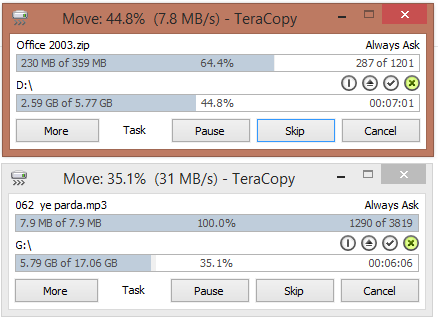
I was downloading Windows 10 Technical Preview this morning. When it was taking too long, I have asked my ISP to increase Bandwidth and they did.

Here is the screenshot. 30 MBPS, whoo! Incredible speed in India.

Feeling Excited. It is downloaded when I write this post. Will install and share some cool screens.

Keep visiting.
Read More

Friday, July 11, 2014

// // Leave a Comment

KitKat update for Motorola Moto E

Hi,
If you are using Motorola Moto E, here is the great news. As motorola has announced on 5th of this month regarding KitKat 4.4.4 update, they have released update today.

Check screens below.


Tap on Setting > About Phone > System Updates if you did not get any notifications.

Oh yes, It is approx 57.9 MB in size, so you can easily download it over mobile data connection.

Enjoy your update.

Thanks for reading. 
John Bhatt
Read More

Wednesday, July 9, 2014

// // Leave a Comment

Software Review - Parental Control Software - Freeware

Hi,

It have been long time since last post. Today I am going to review a software that is is most useful if you work in a office and handle your IT department, If you have children at home and your want to block access to some sites without any visible changes, here is the best application for you.

Introduction:

Software name: Golden Filter Premium
Provider Company: GSI Technologies
File Name: GFPreSetup.exe
File Size: 3.10 MB
Latest Version: 3.1

Features: 

Some of the most important and required features listed below.

  • It does not create any folder or shortcut in Start Menu.
  • It does not create its files at easily visible place.
  • It does not create any taskbar icon while running. No one can know what is running in background.
  • It is totally safe (No Virus, Malware, Adware or any other kind of threat, confirmed with multiple antivirus applications. ex. MSE, Norton, AVG, QuickHeal, McAfee)
  • No listing at Add or Remove Program control panel. No one can remove it easily.
  • Can be disabled using software itself. 
  • Password Protected.
  • Toggle Function keys to show and hide application.
  • Can capture Screen and record to play later for administrator.
  • Restricted words to shut down any application running that contains such words (all supported Browsers).
  • Restricted Software
  • Hiding your important Folders
  • It is FREEWARE.

Screenshots:

Login Screen:

Home Screen:


Application Setting Screen: 
Time Based Setting Screen:
I have just included some of sample images. There a lot more control to use this application.

Download Links


Thanks for reading. One your next visit, I will be writing about the using method of this application with detailed snapshots. Please share if you find this post helpful.

Read More

Friday, May 2, 2014

// // Leave a Comment

Problem Opening Office Documents

Hi,
Today I want to tell you about a common problem that you must have faced if you are still using MS Office 2003. When you tried to open the document created by Ms Office 2007, 2010 or 2013 by default this is in different extension and shows error while opening in lower version. To escape from this problem you either have to uninstall your MS Office package and upgrade to higher version (at least MS office 2007) or Ask the author of file to send a compatible file in Office 1997-2003 version.

But here is a best way that you can try without any cost and without any request.To open all types of Office Documents that are of created with higher versions of MS Office, you can download Office Converter. Microsoft has published it as Compatibility Pack for 2007 Office System.

You may follow the link to downnload Microsoft Office Document Converter.
Steps:

  • Save Downloaded file to disk.
  • When download completes, run the executable file.
  • Proceed to installation.
  • When complete, reboot your system.
This will install all rendering engine in your Office 2003 and you can open your existing files as well as files with newer version.


+John Bhatt

Read More

Wednesday, April 23, 2014

// // Leave a Comment

Running DOS or C/C++ in Full Screen in Windows 7 or 8

Hi,

If you are a developer, of learning programming languages, you must have to deal with Turbo C/C++ compiler. On the early days of Learning, we have used Windows XP which have ability to run Command Prompt (MS DOS) in full screen mode. But Microsoft has ended support to Windows XP and released 4 new operating system after Windows XP. The major change in newer versions is that, they do not support MS DOS in full screen mode.

Now the requirement is, if you have to work on C/C++ application, you have to work in minimized screen. To make it full screen, we have an application named DOSBox, which is open-source and cross platform.
Below is step by step guide to install and configure DOSBox.

  • Download and Install DOSBox from http://www.dosbox.com/download.php?main=1.
  • After installing open DOSBox from menu.
  • You will see following screen.
  • Type following command to load Turbo C compiler in DOSBox.
    MOUNT C C:\TC ⏎
    C: ⏎
    CD BIN ⏎
    TC ⏎
    

Description of Code:

Line 1: MOUNT C C:\TC : Mounts C:\TC (where Turbo C is located) as C Drive. You can choose any drive that exists in your system. This will not effect your existing files.
Line 2: C: : Navigated to C Drive.
Line 3: CD BIN Navigated to Folder BIN normally as we do in MS - DOS.
Line 4: TC Run the Turbo C/C++ Compiler IDE located inside BIN folder.


Lets make it full screen.
Do not forget to change the Directory options from Options menu so that Include directories work fine.
If you find this article helpful, do share with your friends. If you have any suggestions or comments, let us know. We will read and improve ourselves.
John Bhatt
Read More

Thursday, February 6, 2014

// // Leave a Comment

[Solved] Music Library not showing in Music App (Windows 8)

Hi,

I have been using Windows 8 since its early release. I have downloaded Developer Preview in November 2011. I am not sure after that how many times I have installed Windows on my Computer and upgraded its version to Consumer Preview, Release Preview, Windows 8, Windows 8 Pro, Windows Blue Preview, Windows 8.1, Windows 8.1 Pro. Might be due to many installation and security (encryption and decryption, consequent owner-user change) there must be some loss in system volume information file of of hard disc partitions.

Problem

The actual problem has arise after last upgrade. Music App in Windows 8 has left showing songs that is stored in hard disc of computer. I have tried several methods that are suggested and logical.

Situation

Out of 500 GB hard disc, approx 250 GB is filled with Videos (movies) and approx 20 GB is filled with music. Rest of space is consumed by software and other documents. So the 50 GB partition is assigned to Windows and this is the partition which is formatted frequently.

Failed Trials

However, I love Windows Media player and use this as default but being a tester, I never gave up to find the reason behind not listing of library content. I have tried following tricks or methods to solve this problem. 
  • Un-installed application and installed from Store.
  • Cleared all temporary data for application and restored its setting.
  • Changed location setting to United States or United Kingdom but none of them worked.
  • Changed Microsoft Account to local account.
  • Re-installed windows using Clean format.
  • Many more tricks that are suitable as condition and found in various social sites or as suggested by Microsoft support personnels.

Actual Problem

While none of above trials worked, I got confused and search in depth about working mechanism of Music application. Then I opened Library setting in Media player and found a wired term, which got my attention. This is showing non responsive in front of library location. Then I searched and opened Search Indexing Options in windows 8. I tried to add the audio folder in indexing location but that drive is not showing there, so that did not worked too.

The Trick

When searching for that problem, somewhere over internet I found a solution. You want to know the trick huh....
Suggestion 1: Well solution is to delete your partition, format location and re-create the partition to get its state back as it was.
Suggestion 2: Reset permission, user from security settings in drive.
First is nearly impossible for me. After following many tricks, I finally came with some solution.

I did some trick, rather than deleting partition and formatting and getting its state back, 

I moved music data to another partition which was showing properly in Search Indexing option.

In Quick:

  1. Check if you have added folder to music library. 
  2. If first step is OK, then check the status in Windows Media Player> Right click on Music in left navigation (Library view) > Manage Music Library.
  3. If this is showing non responsive then move files to other partition.
  4. If showing OK or nothing special remark, type Indexing service in smart screen.
  5. Open Indexing Service Options and click on modify to add your audio folder.
  6. Close the Indexing Options screen once you finish selecting folders. This will solve your all problems.

Finally this solved the problem for now. 

But that was too hard when you have situation like mine.
Do not forget to leave comment.
+John Bhatt 
Read More

Saturday, February 1, 2014

// // 9 comments

HTTP Error 500.23 - Internal Server Error in Visual Studio 2013

Hi,

I have installed Visual Studio 2013 in my system. Due to some problems, I got the release after few months. So I was excited to use it and taste its new features. One thing I like about Visual Studio 2013 is it has a theme which turns it like Visual Studio 2010, which was simply awesome.

HTTP Error 500.23

I opened a existing website and tried to run that website. The website was using ASP.NET framework 4.0. However, the website has no errors and working fine in previous version of Visual Studio. But when I started with debugging (F5), this produced following error.
HTTP Error 500.23 - Internal Server Error

An ASP.NET setting has been detected that does not apply in Integrated managed pipeline mode.

Solution

I can not understand the problem in a single view, as it suggest to change some configuration different methods in things you can try section. While there is not handler configured in web.config system for Web Server. Instead there was no system.webServer node.
So I searched in Internet and found some suggestion to make changes in Application Pool setting in IIS Manager. I tried that too but that was also a failed trial. Then suddenly I got a click in my mind and tried a setting which worked immediately.
How can the change done in Internet Information Service (IIS) Manager reflect in Development server. When we run the website from Visual Studio it loads in development server instead of IIS. So we have to make change in Development server which will automatically solve all the problems.
I thought, some time you might have same situation and solution must be there before problem.
Step 1: Open visual studio and click in the name of Website Project currently opened. Click on Property pane
.
Step 2: Double click on Managed Pipeline Mode. This will toggle between Classic and Integrated Mode. You have to switch to Classic mode because the error was "An ASP.NET setting has been detected that does not apply in Integrated managed pipeline mode"
.
Now hit the F5 button, here goes output as usual.

You have solved the problem. If you find this post helpful, do not forget to share with friends or simply say thanks in comment below or you can share your feedback by leaving comment below.
+Prithvi Raj Bhatt 
Read More

Wednesday, January 15, 2014

// // Leave a Comment

Custom Message when no rows in GridView

Hi,
Lets get back to ASP.NET series and work with GridView once again. We have previously done following jobs with GridView.
You are suggested to read above posts before reading this post.

Objective

 If you are a ASP.NET developer, you have to work with GridView control every day. In a SQL powered website, this is a must have control and almost every developer uses it. It grabs data from Data Source defined and show in tabular format with added CSS and other features.
But some features are disabled by default, you have to turn them on. Suppose you have no data to display, GridView control simply disappears, your user will not see any design or message. To overcome this, GridView control has a builtin feature that can tell user that there is no data in that case, we have to just turn it on and customize message.

Design

Lets see a below design.
Lets create a SQL Table as below structure.
--Create a Database for temporary purpose.
CREATE DATABASE TestDatabase;
--Use newly created database for forther queries.
USE testdatabase;
--Create a Simple table with 4 columns
CREATE TABLE TestTable
(
StudentID int PRIMARY KEY Identity(100,1),
StudentName nvarchar(150),
CourseName nvarchar(100),
ContactDetails nvarchar(500) 
);
And bind gridview with above table which is empty. Double click on any empty location of Page to go to Page_Load event or just press F7 key to switch between aspx page and Code behind page.
Code as below is suffcient for this task, you can also go for graphical method.
//Include namespaces for DataTable and SQL access.
using System.Data;
using System.Data.SqlClient;

protected void Page_Load(object sender, EventArgs e)
    {
        string ConString = "Server=.\\sqldb;database=testdatabase;integrated security=true;";
        SqlConnection con = new SqlConnection(ConString);
        SqlDataAdapter adp = new SqlDataAdapter("SELECT * from TestTable", con);
        DataTable dt = new DataTable();
        adp.Fill(dt);
        GridView1.DataSource = dt.DefaultView;
        GridView1.DataBind();
    }
Lets view it on browser.
  • Question : Where is our GridView? We have added and binded it with database. 
  • Answer   : Oh! There is no data in table, so it is blank and hidden to free space.  
  • Question : Does user knows about this?
  • Answer   : No, every user might not be familier to ASP.NET and web programming. He will just think some fool has designed page and he forgot to add content in this place. 
So the requirement is to tell user in a familier language that there is no data. So that he can tell you are smart and feel happy with website/application. 

Putting Error Message

We have a attribute property of GridView called EmptyDataText inside Appearance section. Lets have a look at below screenshot.
You can write your error message in case of Empty Data in that textbox or you can simply add a property in GridView code and write its value as below.
<asp:GridView ID="GridView1" runat="server"  
    EmptyDataText="Sorry! There is no data present. Please add or wait for others to enter record."
    EmptyDataRowStyle-ForeColor="Red"  EmptyDataRowStyle-BorderStyle="Solid">

I have added two more attributes named EmptyDataRowStyle-ForeColor which will assign "Red" color as its text color and also EmptyDataRowStyle-BorderStyle attribute which will put a solid border around table. Now save page and view in browser. This will display output as below.


I think this is the actually we wanted to do. Now lets add a record in SQL table and refresh page.
INSERT INTO TestTable VALUES ('John Bhatt','M. Tech','john@johnbhatt.com');

Conclusion

So we can say that, adding EmptyDataText and style for EmptyDataRow does not affect any or our design for normal view.

Do not forget to share and like if you found this helpful. Saying a thank will encourage me. If you find are mistakes and errors in above code and tutorial, please report by leaving a comment here. We will try to rectify and help other members.

+John Bhatt 
Read More

Thursday, January 9, 2014

// // Leave a Comment

Introduction to Torrent

Hi,

Have you heard of torrent? Oh! you must have. Many of you have used torrent to download files and other documents from internet. But many of us are unaware of how torrent works and what torrent is?

Lets talk about Torrent in detail.

What is torrent?

Torrent is actually a computer file type used by BitTorrent protocol. This file contains meta data about the file's and folder's size, their list of locations (called trackers in language of torrent). This has extension of .torrent. One more and most important thing about torrent file is that, it does not contain files or folders that you want to download. It only contains the Structure, Location and other information about file. In current days, this has been replaced by Magnet Link which is a web version (hyper link) of this file containing all information about this file.

History of BitTorrent?

BitTorrent is a peer to peer file sharing protocol developed by Programmer Bram Cohen and first released on April 2001. He released it for public on 2 July 2001 on first time and continuously developed till 2008. As per BitTorrent, Inc which has published official client also, revealed that number of Torrent users per day over world is twice than the users of Facebook and YouTube combined together. 

How it works?

Now, if the torrent file does not contain files to be downloaded, how actually it works? Lets see a image below to understand more clearly.

Requirement and Background

While the file is of Gigantic size and need to be distributed among many users, what is the cost of server. The same amount of data has been transferred to each users. Suppose a file of one GB is to be shared among a thousand users. Then server needs more than a one Terra Byte of bandwidth which will surely cost a lot for any company. This will also impact the performance of server. To overcome this, BitTorrent protocol is designed where you need not to distribute file to each user, Once user downloaded a file, that can even uploaded from users PC.
Most of Computer Science students are known and for others information, data is transmitted in Packets over internet. A complete file can not be transferred at at time if that has lot of data. And you have heard of Bit and Byte. At a single time a limited byte of data can only travel or transmits between two IP (computers).
Suppose, we have a file of 100 MB and our computer hardware determines and think that it can be transmitted if the file has been broken into 100 pieces and then tells receiver that it has send 100 pieces of a file, combine and give to user, in general language. This is also applicable for torrent also. Torrent file has meta data where the piece size has been mentioned. The complete file has been broken into pieces and assigned a serial number (virtual). Then at the time of distribution, these pieces are downloaded to users computer one by one. And most importantly, based on permission from user, the downloaded pieces are again uploaded to other user who is downloading same file.

Advantage

Following are major advantage of torrent protocol for user and uploader.

  • Server cost is reduces because file is later shared using peers (other users who are downloading)
  • Even your Internet get disconnected or you shut down your computer, your files are saved in hard disk and if you think of continuing the download, only remaining pieces will downloaded. This is intelligence added in BitTorrent clients. 
  • Better download speed.
  • Faster distribution
We will talk about legal controversies and other bad aspects of torrent system on later post. 

If you find this post helpful, say thanks on comments or you have any suggestions or feedback on this, please comment.

Read More

Sunday, January 5, 2014

// // Leave a Comment

Cloud Storage : SkyDrive

Hi,
Some time ago, we have talked about Cloud Storage. Continuation of that series, I am going to write here about SkyDrive, a cloud storage facility provided by Microsoft to its user for free with custom upgradable plans also.

Introduction:

SkyDrive logos at various stages

   Microsoft SkyDrive is included with Windows Live product and previously known as Windows Live Folders, then Windows Live SkyDrive and now SkyDrive or Microsoft SkyDrive. Being officially announced on 01 August 2007, this product is tested by some BETA testers across United States and UK. Initially storage capacity is given 5GB per user which is expanded to 25 GB on 02 December 2008. On continuous improvement of service, SkyDrive is integrated with Office Web Apps and Outlook.com (formerly Hotmail) to attach larget Photos and other documents as email attachments. 

Current

Now, SkyDrive is developed for various platforms and available for most of devices. Now it has its native application for Apple's iOS and Mac, Google's Android, Microsoft's Windows (Desktop version for Windows 7 and prior version), Windows 8, Windows 8.1, Windows Phone and XBox 360 also with Web version. Due to high volume of users and popularity, its size has been reduced to 7 GB for new registrations. Emails registered after 22 April 2012 will get 7 GB for free while members registered before that date have 25GB of free storage. You can upload every kind of file in SkyDrive, there is no restriction of File Type. SkyDrive is  currently available over world with 94 languages. Microsoft launched Premium plans of SkyDrive on 23 September 2013 which are divided in 3 classes for 50+, 100+ and 200+ which adds corresponding GBs of data to user account.
The Desktop version and other application has capability to Sync file and save to cloud as preferred by user over internet.

Registration & Login

Everyone, who signs up for Microsoft Live Account has access to All of the Windows Live services including SkyDrive. SkyDrive is accessible at https://skydrive.live.com.

Features

There are lots of feature of using Cloud Storage, but we will just list some of SkyDrive features that are notable.

  • Integrated with Office Web Apps, you can create or edit your document online.
  • Format support of PDF, XML based Document and ODF with lots more.
  • Document Embedding on web and sharing with friends which makes it useful at work.
  • Email Integration, send directly via email as attachment to any email id.
  • Share with Windows Live Groups, such as your office team have access to your work files and they can work even you are not at office and multiple users at at time.
  • Slideshow of uploaded photos.
  • Recycle Bin. Most useful tool for cloud storage. Suppose you uploaded a larger file and deleted by mistake. SkyDrive gives you option to Restore your file within maximum of 30 days period.
  • Download all your files in single Zip file and extract at your machine.

Snapshots

SkyDrive for Web (Current Version)
Android

Windows 8.1

For a Developer

SkyDrive has launched its API so that developer can develop applications for Windows Phone, Windows 8 and 8.1 and other portable devices which has ability to store data and access to SkyDrive of user.

Download

Applications are available for downloads free on various platforms. 

If you found this post helpful, do share and if you have any feedback please post a comment. 
Read More

Friday, January 3, 2014

// // Leave a Comment

New project for Indian Computer Institute (ICI)

Hi,

These days I am working on a website and web application for Computer Institute.

Indian Computer Institute is a complete software training center established in 2008 and served more than 5000 students with excellent placement records. This institute is based in Rani Bagh location of New Delhi and some months ago, on the expansion of its chain of branch, a new Center has been opened at Jahangirpuri in New Delhi.

Project Details:

  • Website

    • Powered by PHP/MySQL platform.
    • WordPress as CMS.
    • Responsive Design.
  • Email

    • Email Service for their custom company.
    • Administration of services.
  • Software

    • Version 1.0.30 of ESKOOL, A complete web based Educational Institute Management system designed for Schools, training center and computer institutes based on ASP.NET platform.
Please have a look at my recent work and provide feedback or suggestions.

Read More

Monday, December 16, 2013

// // Leave a Comment

Conversion Tool for all Number System

Hi,

If you are student of computer science, you must have required this feature sometime. You have to study and make calculation on different number systems. Mostly on Binary, Octal or Hexadecimal and Decimal number system are most used in Computer programming language.
We have collected and uploaded a application to help you. This will calculate the number of your choice to another system and also describe how this happened and actual answers.

As you can see in above snapshot, we tried to convert Decimal Number 100 to Binary number system (that is Base: 2). Answer is 1100100 but we have "Explain Answer" button, which explained the each and every step.

Go to Number Conversion Tool.

All the Best.
+John Bhatt 
Read More

Sunday, September 29, 2013

// // Leave a Comment

Update Album Art of Song in Windows

Hey,

We everybody here loves Music. Must have collected many songs of their choice and I am sure, that collection is downloaded from Internet or loaded from any mobile shop.

How do you feel, when you see any Website Image (Logo), Mobile shop's Image or some other Actors photo while playing media in Media Player.  I am sure, it should make you panic
and also frustrating.
Or the scene might be opposite also, you bought some Music from Internet or elsewhere, But that has some other Artists image there or wrong album image published.
So, you might like to change that Image to your favourite Image or your own creation. I have a solution.

Requirements

 
  1. Microsoft Windows 7,8,8.1 (Tested).
  2. MP3 or other Media Player Supported format.
  3. Image of your choice.

Procedure

 
  1. Copy Image of your choice.
  2. Open Windows Media Player.
  3. Search for your MP3 File or Album.
  4. Right Click on Album Art of Song.
  5. Choose Paste Album Art Option and wait for sometime, if there are a lot of Files.

Other Keywords and search terms:
Change Background Image of MP3, Change Album Art, Remove Photo from Mp3, Media Player Customization, Set Image as mp3 background.
 
Here you go. Your Album Art is updated now.
 
Keep visiting for more posts.
 
Read More

Wednesday, September 18, 2013

// // Leave a Comment

Microsoft Excel 2003 : File Menu and Its Commands-2

Hi,

I am back with Remaining part of Excel's File Menu and Commands.


As you remember, in previous post, we have talked about File Menu Commands upto Web Page Preview.
http://www.prithviraj.com.np/2012/06/microsoft-excel-2003-file-menu-and-its.html

Lets start with remaining commands.


11. Page Setup :


When you click this option Page Setup dialogue box appears from which you can adjust document margins, paper size, orientation, header footer, sheet, etc. This is one of the important option for printing document.

    12. Print Area :

This command sets the print area of current worksheet. You can choose which cell range should be printed in paper. You can also clear print area that you previously set. To Set a Print Area, choose range of cells by selecting, then click on File menu, choose Print Area option and finally choose Set Print Area option. To Remove a Print Area click on File menu, go to Print Area and choose Clear Print Area option.

   13. Print Preview :

This option shows how the document will appear after printing in paper. This is very important task before printing any document to save Paper and money. If any improvement needed you have to adjust document margins and other properties from Page Setup option. 

   14. Print (Ctrl+P) : 


This command sends instruction to attached printer that is configured with system. You have options to choose Printer, Page Range, Number of Copies, etc. Shortcut key for this command is CTRL+P.

   15. Send To :

If you want to send your excel workbook to other people via e-Mail you have following options to send the file. This command has following sub-menu:  

  1. Mail Recipient
  2. Mail Recipient (For Review)
  3. Mail Recipient (As Attachment)
  4. Routing Recipient
  5. Exchange Folder
  6. Online Meeting participant
  7. Recipient using Internet Fax-Service

   16. Properties : 

This command shows you Document Properties dialogue box to edit or change properties of document such as Title, Subject, Author, Company, Keywords, and other values which are very important to determine the documents property value which will creates Identity of file.


17. Exit : 

This command terminates MS-Excel. This is alternative of ALT+F4 key. You can also quit application from Title Bar or Task bar also. If the document is not saved yet, MS-Word prompts you to save document and shows Save As dialogue box if chosen Yes from prompt and terminates after saving, if chosen No, terminates immediately and if chosen Cancel MS-Excel remains opened. 


Keep reading, for more Tutorials and Articles subscribe. 

All the Best. 


Read More

Saturday, July 27, 2013

// // Leave a Comment

Maintenance Complete in Download Center

Hi,

We have finished migrating all thing from Previous Host to New Host. Download Center is expected to Work as same as previous days. Accounts registered with our website has been kept same and you can log in with earlier credential. Other URLs and Bookmarks you added will also remain same and working.


However, Live FM's will be down for some more hours. We are working and collecting more reliable sources of stream. Once it will be done, we will notify you here.

You can keep in touch by Adding us on Facebook page, Just hit Like and Click Show in Feed link which will appear on hovering Like Button. You can also subscribe to new songs on Download Center  via Feedburner Service by Google. Google will drop you a mail once New Song is available on Download Center.

We have shifted to Higher Configuration and Dedicated Server without any Limitations, So Website is expected to load in less time and other resources also.

Till then, enjoy New songs in Download Center and have fun.


Regards,
+John Bhatt & Team
P.Yar.B Complex
Read More

Friday, July 26, 2013

// // Leave a Comment

Maintenance in Download Center

Hello Everyone!

Due to some serious Errors, I need to take Website Down. I am changing Host and Migrating Files and Databases so that there will be no difficulties while accessing and browsing.


Will be back soon.

Thanks for your patience.

John Bhatt
P.Yar.B Complex

Read More

Tuesday, June 11, 2013

// // Leave a Comment

Cloud Storage : Introduction

Hello Everyone!

Today, I am here to discuss about Cloud Storage. This is word nowadays almost all must have heard from their Email Provider or on Advertisements. Even Mobiles tell us to save our Data into cloud. So, finally I am here to clear your confusion and to tell you all I know about Cloud Storage.
Definition from Wikipedia: "Cloud storage is a model of networked enterprise storage where data is stored not only in the user's computer, but in virtualized pools of storage which are generally hosted by third parties, too. Hosting companies operate large data centers, and people who require their data to be hosted buy or lease storage capacity from them. The data center operators, in the background, virtualize the resources according to the requirements of the customer and expose them as storage pools, which the customers can themselves use to store files or data objects. Physically, the resource may span across multiple servers. The safety of the files depends upon the hosting websites."

Requirement :

  • Suppose You have Files stored in your Office PC, you came out of office and need that file urgently, or you have more work and want to work from Home also. 
  • You took a Image from Camera and want that photo on your PC Also. 
  • You frequently have problems with your Device and need them repair and high chances of data Loose. 
  • You are tech guy and try latest softwares and Operating System in your Main Machine (Mobile, PC, Laptop). In that case each time you need to format your machines and you will loose all files including important files.
  • You work on public computer and don't want to save your Files there.

There are so many such situations which cause us to search for a place to save our data that we can access anywhere, anytime. Architects then came with Idea to utilize Web Hosting Service to full fill the requirement. But make them more secure and only accessible using Authenticated Process.

So they created Web Service APIs (Application Programming Interfaces) and make some kind of Web Software (Browser based) and other application for various devices. Most of them are Paid but some services offer some Free space also.

The Computer Software Giant Microsoft has Launched a Service named Windows Live Folders later known as SkyDrive on 1 August 2007. This is currently Offering 25 GB Free Space to earlier users and 7 GB for New users registered after 22 April 2012. More space can be purchased.

Also Internet Giant Google has launched a Service called Google Drive on 24 April 2012. Which is offering 15 GB data for Free. This is enhanced and combined storage for GMail, Photos and Documents and Files.

Also there are many such services like Box, Dropbox and many more. I will be discussing more details about these Services in Future Posts.
Till then read earlier posts, you can add me on Google Plus using +John Bhatt .
Read More

Thursday, May 23, 2013

// // Leave a Comment

Facebook Home on HTC Desire V

Hello Friends,

I have recently forcefully Installed Facebook Home on my HTC Desire V device.

HTC Desire V is a Android device with 1 GHz Processer and 512 MB RAM in general words running Android 4.0.3 (Ice Cream Sandwitch) with HTC Sense 4.0.


After a whole day use of Facebook home, I made below conclusion.

1. Facebook Home is Launcher for Android which comes with Full Screen, Its Own Lock Screen, Flashing Updates with Images on Background.

2. It has support for Main Menu and its some applications.

3. It consumes More Battery (approx 15-20%).

4. It consumes More RAM.

5. It consumes more Data. Unable to measure because I have Unlimited Data plan. But not recommended if you have metered connection.

5. Other Apps are hidden by default and you can not put any widgets on Home Screen. Even if you want to use Phone or Mail Application, you have to follow many steps to get to those applications.

6. Default Notifications like Battery, Network Signal and other Notifications are not visible by Default.

7. Facebook Notifications are displayed in Home Screen with Tap to view feature but opened in native Facebook application.

Overall a Good application for those who use Android for Facebook only. But for others, who use many more out of android and have Android with Lower RAM and lower memory it is not recommended until next update.

Hope Facebook Developers will Fix this soon and we will get more of this and will be happy by replacing Default Launcher with Facebook Home.

Till then you can add me to Google Plus. My Profile is +John Bhatt 
Read More

Monday, April 22, 2013

// // Leave a Comment

Android : Introduction

Hello Friends,

Today, I am going to start New Topic here on my blog. This will be about Android.

We all have android devices and why not to talk about them. Its time to make you informed about the Basic and Important Tips and Things to be done to secure your Mobile and Maximize your Fun.

Definition and Background: 

Android is a Linux Based Mobile Operating System designed for Mainly Touch Screen Devices Initially Designed and Developed by Android Inc. You can find more about this Company, Founders and History on Wikipedia. Some time later, Google bought Andoid Inc and started to Develop it for Mobile Release. For the First Time, Android is released on September 23, 2008. Many of Hardware Manufacturer have implemented the Android System and Customized some UI (User Interface) to make it like their own product because Android is an Open Source Project developed using C, C++ and Java. But the Core system remains same and controlled using Google Services Like Play, Sync and some other Background features and some other Vendor Features so that they attract customers.

Official Website is Android is http://www.android.com and for developers it has its site under subdomain, http://developer.android.com and Source Code can be found at http://source.android.com.

At this time, Most of Android Device (Approx 44 % of All Device) are using Its version 2.3 (and its Minor Versions) and then Approx 29% of Android Devices are using Version 4.0 ( and its Minor Versions).

An Android Device of a Good known company costs Approx 7,000 INR, while there are some Local vendors selling cheaper than these. And Predecting the Highest Rate for an Android is still a difficult task But the cost is compared to their efficiency (Processor Speed, RAM, Internal Memory, Supported Networks, Included Sensors and other Features like Battery Life, Network Capabilities etc).

We will be talking about Features that we must enable and use while using an Android and some more topics in future posts. Till then Keep reading my blog and you can add me on Google+ also. My Profile is +John Bhatt .
Read More

Wednesday, January 2, 2013

// // Leave a Comment

Run Commands Listed In Alphabetical Order-2

Hi,
Here are the remaining Run Commands for Windows Operating System listed in Alphabetic Order.


Nero ( if installed )
nero
Netmeeting
conf
Network Connections
control netconnections
Network Connections
ncpa.cpl
Network Setup Wizard
netsetup.cpl
Notepad
notepad
Nview Desktop Manager ( if installed )
nvtuicpl.cpl
Object Packager
packager
ODBC Data Source Administrator
odbccp32
ODBC Data Source Administrator
odbccp32.cpl
On Screen Keyboard
osk
Opens AC3 Filter ( if installed )
ac3filter.cpl
Outlook Express
msimn
Paint
pbrush
Password Properties
password.cpl
Performance Monitor
perfmon.msc
Performance Monitor
perfmon
Phone and Modem Options
telephon.cpl
Phone Dialer
dialer
Pinball Game
pinball
Power Configuration
powercfg.cpl
Printers and Faxes
control printers
Printers Folder
printers
Private Characters Editor
eudcedit
Quicktime ( if installed )
quicktime.cpl
Quicktime Player ( if installed )
quicktimeplayer
Real Player ( if installed )
realplay
Regional Settings
intl.cpl
Registry Editor
regedit
Registry Editor
regedit32
Remote Access Phonebook
rasphone
Remote Desktop
mstsc
Removable Storage
ntmsmgr.msc
Removable Storage Operator Requests
ntmsoprq.msc
Resultant Set of Policy ( xp pro )
rsop.msc
Scanners and Cameras
sticpl.cpl
Scheduled Tasks
control schedtasks
Security Center
wscui.cpl
Services
services.msc
Shared Folders
fsmgmt.msc
Sharing Session
rtcshare
Shuts Down Windows
shutdown
Sounds Recorder
sndrec32
Sounds and Audio
mmsys.cpl
Spider Solitare Card Game
spider
SQL Client Configuration
clicongf
System Configuration Editor
sysedit
System Configuration Utility
msconfig
System File Checker Utility ( Scan Immediately )
sfc /scannow
System File Checker Utility ( Scan Once At Next Boot )
sfc /scanonce
System File Checker Utility ( Scan On Every Boot )
sfc /scanboot
System File Checker Utility ( Return to Default Settings)
sfc /revert
System File Checker Utility ( Purge File Cache )
sfc /purgecache
System File Checker Utility ( Set Cache Size to Size x )
sfc /cachesize=x
System Information
msinfo32
System Properties
sysdm.cpl
Task Manager
taskmgr
TCP Tester
tcptest
Telnet Client
telnet
Tweak UI ( if installed )
tweakui
User Account Management
nusrmgr.cpl
Utility Manager
utilman
Volume Serial Number for C:
label
Volume Control
sndvol32
Windows Address Book
wab
Windows Address Book Import Utility
wabmig
Windows Backup Utility ( if installed )
ntbackup
Windows Explorer
explorer
Windows Firewall
firewall.cpl
Windows Installer Details
msiexec
Windows Magnifier
magnify
Windows Management Infrastructure
wmimgmt.msc
Windows Media Player
wmplayer
Windows Messenger
msnsgs
Windows Picture Import Wizard (Need camera connected)
wiaacmgr
Windows System Security Tool
syskey
Windows Script host settings
wscript
Widnows Update Launches
wupdmgr
Windows Version ( shows your windows version )
winver
Windows XP Tour Wizard
tourstart
Wordpad
write
Zoom Utility
igfxzoom


Drop a comment below to reach me or provide feedback on above post.

Happy to Help. 
Glad to Be,
John Bhatt
Read More